
In the room
One phone on the table writes down what everyone says, even the quiet voices.
Meeting across languages? Minu interprets live and writes it down in both.

Audio files are never stored
0.2 s from speaking to text on screen · in-house measurement
Focus on the meeting.
Minu takes the notes.
— From everyday meetings to interpreted multilingual ones.
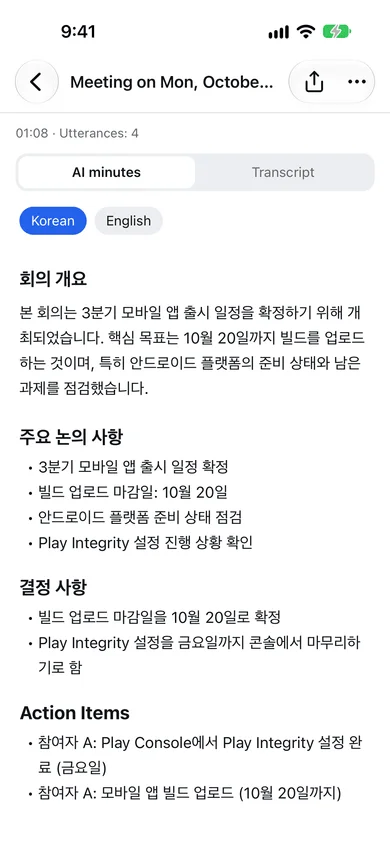
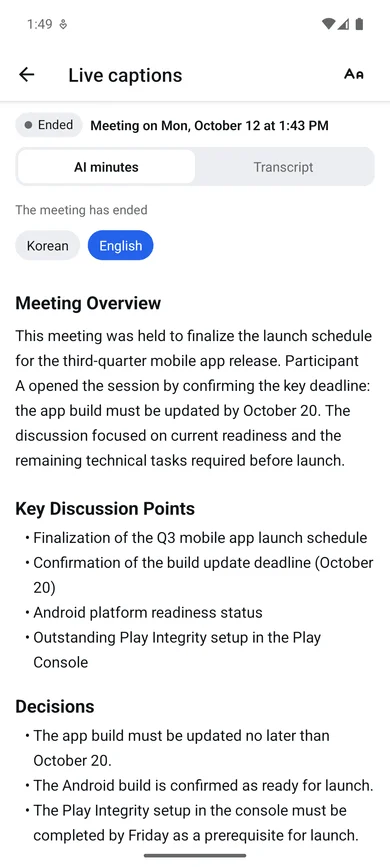
01AI meeting notes
The moment the meeting ends, AI lays out the overview, decisions and to-dos.
02Live transcription
In-house measurement: the time from speaking in the app to the transcribed text appearing on screen.
03In use
One phone on the table writes down what everyone says, even the quiet voices.

Send a link and everyone speaks their own language. The original and the translation appear together.

Set your product names and industry terms, and Minu transcribes and translates them exactly.

Decisions and to-dos are already in the notes, so nobody has to ask who is doing what.
04International meetings
60languages — pick any two and Minu writes in both.
한국어 / English / 日本語 / 中文 / Español / Français / Deutsch / Tiếng Việt +52
05Mirroring
People who join by link see the same screen in a browser — no app needed.
One phone listens and writes everything down.
Attendees join instantly, up to 15 depending on your plan.
Attendees follow the captions in a browser without the app. Signing in is only needed to speak.

06Records
Audio is used only to transcribe. Only the written record is stored.
Deleted automatically after that. Pro keeps records for 1 year.
Send the notes and the transcript in one go.
07Pricing
Try it with short meetings.
Free
For teams that meet every week.
$9.99/mo.US dollars, before tax
For long meetings and big audiences.
$24.99/mo.US dollars, before tax
Monthly plans. Subscribe and cancel in the App Store or Google Play; after cancelling you keep the plan until the paid period ends.
08FAQ
Minu transcribes meetings in real time and turns them into AI meeting notes when they end. In meetings across languages it writes in both languages and makes notes in each.
Text appears on screen 0.2 seconds after you speak in the app (in-house measurement).
Minu transcribes single-language meetings, such as a meeting held only in Korean. For meetings across languages, pick two of 60 languages and it writes in both. The app itself is available in 13 languages, including English, Korean, Japanese and Chinese.
No. They open the link or scan the QR code and read the captions in a browser. Signing in is only needed to speak into the meeting.
No. Audio is used only to make captions and is not stored. What stays is the text transcript and the notes.
Free costs nothing (60 minutes a month), Pro is $9.99 a month (15 hours) and Pro Plus is $24.99 a month (45 hours), in US dollars before tax. Local prices are shown in the store.
All meetings and notes are deleted on the day your paid period ends. We remind you 7 days and 1 day before, so export any notes you want to keep as PDF first.

Coming soon to the App Store and Google Play.
App Store · Coming soonGoogle Play · Coming soon